

This is the quiet conversion killer most marketers underestimate. Getting people to arrive is hard enough. Getting them to willingly hand over their name, email, company size, budget range, and timeline? That's going to need a form experience that feels like a conversation, not a compliance exercise. The data you'll need to qualify a lead is usually the data they least want to give you - and how easy you make it for them makes the difference.
Two tools dominate this conversation: Typeform and SurveyMonkey. Both are widely used, are capable, and show up constantly when marketers start researching ways to build better lead capture. But they were built with different philosophies, different audiences, and different ideas about what a form experience should feel like - and those differences have consequences for your completion rates and lead quality.
If you're wondering which tool is worth your time and budget, you're in the right place.
Key Takeaways
- Typeform's one-question-at-a-time format reduces friction and can drive completion rates up to 59% higher than traditional forms.
- SurveyMonkey's denser page-based format introduces friction that may self-select more invested, higher-quality leads.
- Typeform generates 31% more qualitative data in open-ended responses, giving sales teams richer context per submission.
- Typeform offers more templates and branding customization on lower-tier plans; SurveyMonkey locks advanced customization behind higher pricing.
- Neither platform is universally better-Typeform suits cold or mobile-first leads, while SurveyMonkey fits large-scale structured research.
How Each Platform Approaches the Form Experience Differently
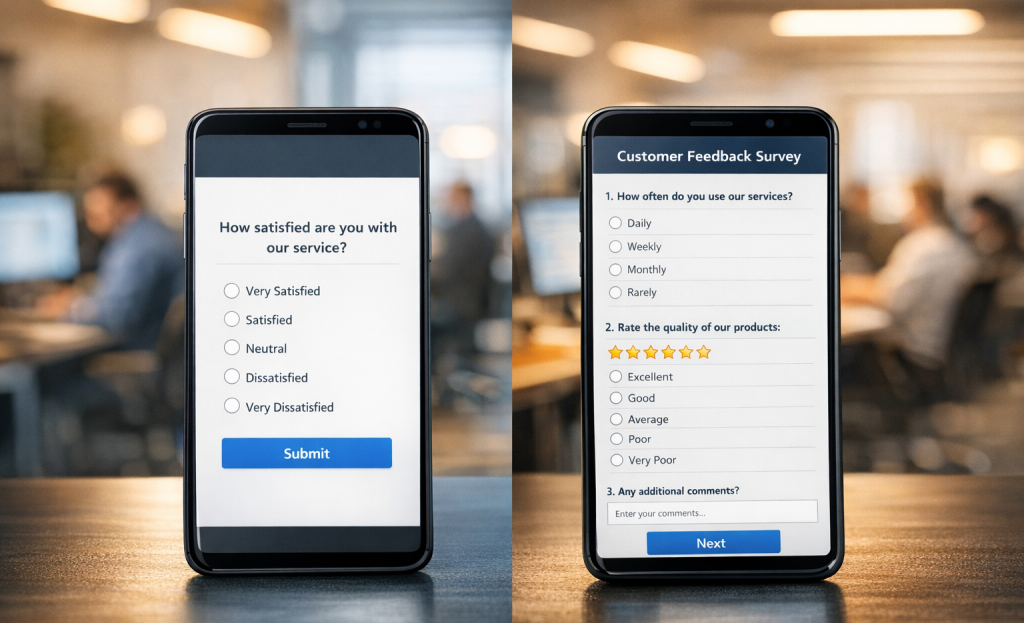
Typeform and SurveyMonkey are built on two very different ideas about what a form should feel like. Typeform shows one question at a time and moves the person forward as they answer, which gives the whole thing a conversational pace. SurveyMonkey takes the traditional path and puts multiple questions on a single page, which is familiar but can seem more like homework.
The format shapes how a person feels while filling something out, and that matters quite a bit for lead forms.
Picture someone on their phone at 9pm trying to fill out a form after a long day. A wall of questions is easy to abandon. A single focused question is much easier to answer and move past. Typeform's one-at-a-time format lowers the mental effort at each step, which is a benefit when attention is short.
Typeform has claimed internally that its format drives completion rates as high as 59% higher than traditional forms; it's worth knowing whether that gap holds up in your context, and completion rates do matter when you're trying to generate leads at scale.

A completed form is not automatically a qualified lead. If a format is so frictionless that anyone breezes through it, you might end up with more replies but a lower percentage of people who are actually ready to buy, hire, or follow through.
SurveyMonkey's denser format introduces a small amount of friction, which isn't always a bad thing for lead quality. Someone who takes the time to work through a full page of questions is probably more invested in what's on the other side. That self-selection can quietly do some of the qualification work.
Typeform's format tends to feel warmer and personal, which builds trust early in the interaction. SurveyMonkey feels more structured and utilitarian, which works pretty well when your audience expects a formal process or you're collecting information from professionals in a work context.
Neither strategy is wrong. That distinction matters more than people give it credit for.
Templates, Customization, and First Impressions That Affect Lead Quality
SurveyMonkey has around 150 templates. Typeform has over 3,000.
When a template matches your goal closely, you spend less time rearranging questions and more time thinking about what you actually want to learn from leads. A marketing manager without a design background will gravitate toward the template that needs the least amount of work. That choice shapes the form they publish, and the form shapes who responds and how they connect with it.
Typeform's templates are built around a one-question-at-a-time layout, which means the visual presentation is already doing some of the work. SurveyMonkey's templates follow a more traditional page-based format. Neither is wrong. But the starting point matters when you're under deadline pressure and need something to go live.

Branding is where things get interesting from a lead quality perspective. A form that looks generic - no logo, default colors, no brand alignment - can make a prospect pause. It's a small friction point. But it tells something. If your form looks like it was thrown together, it reflects on how much you value the person filling it out. Small design details like these can have a real impact on conversions.
Typeform lets you customize fonts, colors, and backgrounds even on lower-tier plans. SurveyMonkey does allow branding too. But more advanced customization is locked behind higher pricing tiers. For smaller teams who want a polished look without paying for a business plan, Typeform gives more out of the box.
| Feature | Typeform | SurveyMonkey |
|---|---|---|
| Number of templates | 3,000+ | ~150 |
| Custom branding on base plans | Yes | Limited |
| Font and color control | Yes | Higher tiers only |
| Logo removal (white-labeling) | Paid plans | Paid plans |
The first impression a form makes does affect completion rates. A lead who drops off before finishing a form is a lead you never captured. Understanding the psychology behind what drives people to take action can help you design forms that hold attention through to submission.
Lead Capture Logic - Conditional Branching and Smart Question Routing
The way a form routes through its questions has a direct result on lead quality. Done well, conditional logic lets you filter out poor-fit respondents early and move high-intent leads faster toward a conversion point. Done poorly, it gives you a tangled path that frustrates visitors into leaving.
Both platforms support conditional branching and score 9.0 on G2's Ease of Setup metric; it's a basic starting point. But the score only reflects first setup - not once your logic gets more layered.
Where the Experience Starts to Diverge
Typeform's logic is built around its one-question-at-a-time format, which makes easy branching feel very natural. If someone answers "No" to a qualifying question, you can path them to a polite exit screen without them ever seeing the rest of the form. That early disqualification keeps your lead list tighter. The challenge shows up when you want to build more complex logic across multiple conditions - it can take more steps to set up than you'd expect from this clean interface.
SurveyMonkey gives you more visible control over branching rules from a structural standpoint. You can see the full form layout and map skip logic across it, which helps when you're taking care of longer flows with a few branching points. The tradeoff is that the interface feels more technical and takes longer to learn for those who aren't used to survey-building tools.
What Marketers Should Watch For
One common pitfall is logic that disqualifies leads too aggressively too soon. If your form cuts out based on a single early answer, you risk losing leads who may have converted with a bit more context. It's worth tracking these drop-off points as part of your website's micro-conversion metrics to understand where the friction is actually coming from.
Another thing to watch is routing that creates dead ends. If a branched path doesn't lead anywhere actual - no confirmation, no redirect, no next step - the lead is basically lost. Both platforms let you set destination URLs or custom endings, so this is fixable. But it's easy to miss during setup. If you're evaluating broader tools to support your lead capture flows, alternatives built specifically for growing your email list may offer tighter routing controls out of the box.
| Feature | Typeform | SurveyMonkey |
|---|---|---|
| G2 Ease of Setup | 9.0 | 9.0 |
| Conditional logic style | Question-level branching | Page and question-level skip logic |
| Complex multi-condition logic | Limited without workarounds | More flexible but steeper to learn |
| Early disqualification support | Strong with exit screens | Supported via skip to end |
Data, Reporting, and What Happens After Someone Hits Submit
Getting replies is only half the job. What your team does with that data is where the two platforms start to pull apart in meaningful ways.
On the export side they're nearly identical. G2 scores at almost the same level - Typeform at 8.7 and SurveyMonkey at 8.6 - so neither has an edge when it comes to pulling raw data out and moving it somewhere else. CSV exports, API access and native integrations with tools like HubSpot, Salesforce and Mailchimp are available on both platforms at higher tiers.
The difference shows up in how each platform presents that data before you export anything. SurveyMonkey leans into structured reporting dashboards with filters, cross-tab analysis and the ability to compare replies across multiple surveys - it's built for teams that want to run analysis inside the platform itself instead of exporting everything to a spreadsheet.

Typeform takes a lighter approach to reporting. The visual summaries are clean to read at a glance. But they're not designed for deep analysis. If your team wants to slice data in multiple ways, you'll probably want to push replies into another tool.
That said, the quality of what comes through in Typeform replies tends to be better - especially in open-ended questions. A 2022 study found that Typeform generated 31% more qualitative data in open-ended replies compared to traditional survey formats. For a sales team reviewing form submissions, that extra detail can make a difference. More context in a response means less follow-up to find out what a prospect actually needs. Tools like Viewers.com can help enrich those submissions further by turning anonymous respondents into identified leads.
SurveyMonkey replies tend to be more structured and easier to quantify, which fits teams running market research or tracking patterns across large volumes of submissions - it can depend on what your team needs to do with the information once it lands in your inbox. If you're also running A/B testing on your website, pairing that data with structured survey results can reveal patterns that neither source shows alone.
| Feature | Typeform | SurveyMonkey |
|---|---|---|
| G2 Data Export Score | 8.7 | 8.6 |
| Reporting Depth | Visual summaries | Advanced dashboards |
| Qualitative Response Volume | Higher (31% more in open-ended) | Standard |
| CRM Integration | Available on paid tiers | Available on paid tiers |
The integration story is fairly even across the board, so the question is how much analysis your team wants to run inside the platform versus outside it.
Pricing Structures and What You Actually Get at Each Tier
Both platforms have free plans, but those free tiers are fairly limited for lead generation. The features that move the needle - like logic jumps, CRM integrations, and removed branding - sit behind paid plans on both sides.
Here is a quick look at how the tiers compare across the features that matter most for capturing leads.
| Feature | Typeform | SurveyMonkey |
|---|---|---|
| Free plan responses | 10 responses/month | 25 responses/survey (capped) |
| Logic/branching | Paid plans only | Available on mid-tier and above |
| Custom branding removal | Plus plan and above | Advantage plan and above |
| CRM integrations | Business plan and above | Team plans and above |
| Starting paid price (approx.) | ~$25/month (Basic) | ~$39/month (Individual Advantage) |
Typeform's Basic plan unlocks unlimited replies and logic features, which makes it a solid entry point for small teams running lead campaigns. The jump to the Business plan is where integrations like HubSpot and Salesforce become available, and that's where the price increases feel more significant.
SurveyMonkey's individual plans are actually quite limited for teams. To get shared access and collaboration tools, you'll have to move to a team plan, which can add cost fast. A small team that wants to run campaigns together will hit that wall pretty quickly.
The response cap is worth watching on both platforms. Typeform's free plan caps at 10 replies per month, which is restrictive if you run any active campaign. SurveyMonkey's free cap is per survey instead of per month, so a busy campaign period can stop your data collection mid-run without much warning.
For bigger teams or business use, SurveyMonkey has more established business pricing with admin controls and compliance features. Typeform has business options too. But its strength sits more in the small-to-mid business range where design and conversational flow take priority over heavy admin infrastructure.
Neither platform is the cheaper choice across the board. The better value can depend on features your team needs at the tier you can afford to stay on long-term.
So, Which One Actually Wins the Lead Generation Game?
Neither tool is universally better. But if your leads are cold, skeptical, or mobile-first, Typeform's one-question-at-a-time format cuts back on friction in a way that traditional form layouts can't match. If you're qualifying existing contacts, running internal research, or need statistically reliable data at scale, SurveyMonkey's infrastructure is built for that.
Before committing to either platform, run one form with real traffic - not a test audience. But leads. Measure completion rates, drop-off points, and the quality of replies you get. The best lead capture form is the one your leads will actually finish.
FAQs
What is the main difference between Typeform and SurveyMonkey?
Typeform shows one question at a time for a conversational feel, while SurveyMonkey displays multiple questions per page in a traditional format. This fundamental difference affects completion rates, lead quality, and how respondents emotionally engage with the form.
Which platform has higher form completion rates?
Typeform claims its one-question-at-a-time format drives completion rates up to 59% higher than traditional forms. However, SurveyMonkey's added friction may self-select more invested, higher-quality leads despite lower overall completions.
Which tool offers better branding and customization options?
Typeform offers more customization on lower-tier plans, including fonts, colors, and backgrounds. SurveyMonkey locks advanced branding behind higher pricing tiers, making Typeform the better option for smaller teams wanting a polished look affordably.
Which platform is cheaper for lead generation?
Typeform's Basic plan starts at roughly $25/month, while SurveyMonkey's Individual Advantage plan starts at around $39/month. Neither is universally cheaper-the best value depends on which features your team needs at a sustainable pricing tier.
Which platform is better for mobile-first audiences?
Typeform is better suited for mobile-first or cold audiences, as its single-question format reduces cognitive load on smaller screens. SurveyMonkey's denser page layout is better suited for professional or structured research contexts.


