

Studies show that roughly 70% of online shopping carts are abandoned before a transaction is completed. For most eCommerce businesses, that number represents a staggering amount of possible revenue quietly slipping out the door every day.
Exit-intent technology was built specifically to help with that - the split second before a visitor leaves. By detecting behavioral tells that suggest a visitor is about to get away, it gives you one last chance to engage them. Whether that's through a well-timed offer, a gentle push, or a simple reminder of what they're leaving behind, it's become one of the more quietly powerful tools in conversion rate optimization, and yet many marketers still don't completely understand how it works.
I'll break it all down. You'll get a look at the mechanics behind exit-intent detection, why it tends to convert well when it's done right, and what separates the campaigns that win visitors back from the ones that just add to the noise.
Key Takeaways
- Roughly 70% of online shopping carts are abandoned, making exit-intent technology a critical last-chance conversion tool.
- Exit-intent detects leaving behavior through mouse movement, scroll patterns, and mobile gestures to trigger timely popups.
- Behavior-based triggers outperform static time-delay popups by approximately 35-40% in conversion rates.
- Real urgency elements like countdown timers can lift conversions from 4.63% to 7.34%; fake urgency damages brand credibility.
- Exit-intent works best connected to follow-up systems like email sequences and retargeting ads, not as a standalone tactic.
What Exit-Intent Technology Actually Is
Exit-intent technology is a system that watches how a user moves around a webpage and triggers a response the second they show signs of leaving. That response is usually a popup, a message, or a targeted prompt designed to re-engage them before they're gone.
At its core, it's a last-chance communication tool. A visitor who lands on your page and browses around has already shown some level of interest - and that matters. Losing them without a word means losing an actual opportunity to connect.
The problem it solves is pretty simple. Most leave a website without doing anything - no buy, no sign-up, no contact. Exit-intent technology gives you one final second to reach them, right before that happens. That timing is what makes it different from a banner ad or a welcome popup.
Reaching them at the exit moment works way better than reaching them earlier because the context is different. Earlier in a visit, a person is still looking around, and a hard-sell message can seem intrusive. At the exit moment, they've already made a mental choice to leave, so a well-placed message doesn't interrupt anything - it just opens a door they hadn't considered.

It also works way better than reaching them after they've left. Once a visitor closes the tab, you're down to email retargeting or paid ads to get them back, and that costs more effort and money. Exit-intent puts the message in front of them while they're still there and still reachable.
It's less a retention trick and more a communication gap being filled. The visitor was going to leave anyway - this technology just makes sure you had a chance to say something first.
The Tracking Signals That Detect Leaving Behavior
The whole system depends on reading behavioral tells in real time. When someone is about to leave, they do things that are measurably different from what they do when they're engaged - and exit-intent technology is built to see those differences.
The most well-known signal is mouse movement. When a visitor moves their cursor toward the top of the browser window - heading for the address bar, the back button, or the close tab - the script picks that up almost immediately. That upward trajectory is one of the strongest predictors of an imminent exit on desktop.
Scroll behavior shows something completely different. A sudden increase in scroll speed paired with a direction change toward the top of the page suggests the visitor has mentally checked out and is ready to leave - it's different from normal browsing; it's a pattern.
Tab-switching is another signal worth attention. When a visitor flips to a different tab, that's a softer signal on its own but can become more meaningful in combination with other behaviors. Systems that track multiple tells together tend to be more accurate than the ones watching for just one.

Mobile devices work differently because there's no cursor to track. Instead, mobile exit-intent relies on things like fast back-swipe gestures and sudden upward scroll bursts that suggest a user is about to hit the back button or close the browser entirely.
This behavior-based strategy outperforms static delay triggers - where a popup fires after a set number of seconds - by around 35 to 40 percent in conversion terms. That gap matters because it shows the difference between interrupting at a random moment and catching them at a predictive one. If you're evaluating which tools support this kind of detection, our list of Hellobar alternatives covers several options worth comparing.
The Types of Exit-Intent Popups and What Each One Does
Not every exit-intent popup is a discount. There are a few formats and each one is built for a different job depending on where the visitor is in their process.
| Popup Type | Use Case | Best For | Typical Trigger |
|---|---|---|---|
| Discount or coupon | Recover a sale with a price incentive | E-commerce product pages, cart pages | Exit from cart or product page |
| Lead capture form | Collect an email before the visitor leaves | Blogs, landing pages, service sites | Exit from any high-traffic page |
| Content upgrade | Trade a resource (guide, checklist) for an email | Content-heavy sites, SaaS blogs | Exit from a specific article or post |
| Cart reminder | Remind the visitor what they left behind | E-commerce cart and checkout pages | Exit from cart or checkout |
| Survey or feedback prompt | Learn why the visitor is leaving | Any page with a high exit rate | Exit from product, pricing, or homepage |
| Free trial or demo invite | Lower the barrier to entry for a new user | SaaS pricing and feature pages | Exit from pricing or sign-up page |
Cart reminder popups perform well in e-commerce. According to OptiMonk, exit-intent popups on cart pages reach a 17.12% conversion rate on average, which is especially strong for a popup format.
The instinct to throw a discount at every leaving visitor is understandable, but it can backfire. A visitor reading a blog post is not in the same headspace as a person who just added three items to a cart, so the formats that work for one will feel out of place for the other.
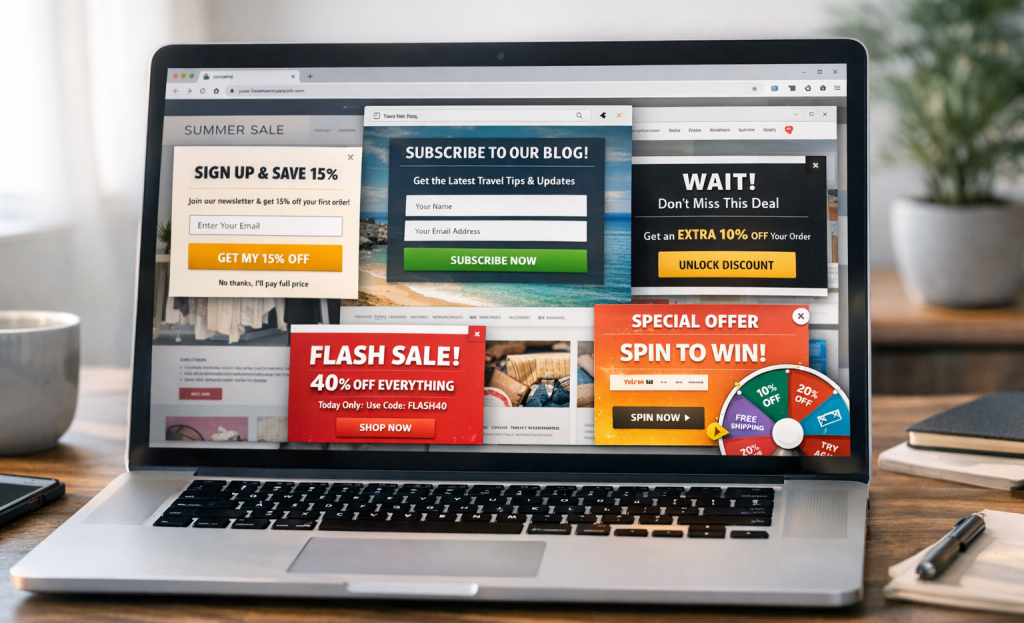
A survey popup on a checkout page can interrupt momentum at the wrong moment, and a discount popup on an informational page can seem pushy to a person who was never close to buying anything.
The format you pick should go well with what the visitor actually needs at that second - not just what you want from them.
Why the Timing and Trigger Logic Makes or Breaks Performance
Getting the popup type right is only half the job. Knowing when to show it has a bigger impact on conversions than you might expect.
Show a popup too early and visitors feel rushed before they've had a chance to connect with your page. Show it too late and they're already gone. Show it too many times and you've trained your audience to dismiss it without reading a word.
Session time thresholds are one of the first things to get right. If someone has been on your page for less than ten seconds, they haven't read enough to make a real choice either way. Waiting until they've had actual time to engage means the popup reaches them at a point when the message actually lands.
Page-depth rules work in a similar way. A visitor who has scrolled 70% down a product page has shown intent to read, which makes them a much better candidate for an exit popup than a person who bounced from the top. Trigger logic that accounts for scroll depth tends to produce cleaner results.

Device type matters too. Mouse-leave detection doesn't translate to mobile, so mobile triggers use scroll velocity and back-button behavior instead. If your settings are desktop-only defaults, you're likely leaving mobile conversions behind.
Frequency caps are also worth taking seriously. Showing the same popup on every visit frustrates repeat visitors and inflates your impression count without adding actual value.
To put this in context, Wisepops analyzed one billion popup shows and found an average conversion rate of 4.82%. Popupsmart reported a 3.49% conversion rate and a 7.05% interaction rate across more than 10,000 campaigns. Those numbers are achievable, but they assume the trigger logic is actually dialed in.
If yours is still running on default settings, that's the first thing worth changing.
Urgency Elements That Push Exit Popups Over the Edge
The trigger gets them to see your popup, but what's inside it determines what they do next. Urgency and scarcity elements are some of the most helpful tools you can put in that space.
Countdown timers are the most studied example. Adding one to an exit popup has been shown to lift conversions from 4.63% to 7.34%, which works out to roughly a 58% increase; it's a real jump from a single visual ingredient. The reason it works is simple - people move faster when they sense a deadline, even a short one.
Limited stock notices work on a similar principle. Telling someone there's only three items left gives them a feeling that the window is closing, and that feeling motivates action. Expiring discounts do the same thing, but with price as the anchor instead of availability.

Urgency only works when it's actual. Readers have seen enough fake countdown timers that reset every visit to find the pattern, and once they do, the popup loses all credibility. Worse, that skepticism doesn't stay contained to the popup - it spreads to how they see your brand as a whole.
Your audience will draw the line between genuine urgency and manufactured pressure. A sale that actually ends, stock that actually runs low, a bonus that actually disappears - these create urgency that people respond to without feeling manipulated. A timer that loops or a "limited" label on something that's always available does the opposite.
Real urgency reinforces trust because it respects the person enough to tell the truth. Fake urgency trades a short-term click for a long-term credibility cost, and that's not a trade worth making.
How Exit-Intent Fits Into a Broader Conversion Strategy
Exit-intent can recover a real slice of abandoning visitors, but it works best as one layer in a connected system. Conversion Sciences found that well-designed exit messages save 10-15% of abandoning visitors, and that's an actual win. What happens to those visitors next is what determines the full value.
When someone opts in through an exit popup, they are entering the start of a relationship - not the end of an interaction. That email address needs to go somewhere helpful, like a welcome sequence that moves them closer to a buy. If you don't have a follow-up plan, you've caught their attention and done nothing with it.
Email sequences are the most direct next step. A short series of two or three emails can reinforce the popup's message, address hesitation, and give the visitor a reason to return. That's where the exit popup's value actually gets realized.

Retargeting ads are another natural connection. If someone dismisses the popup without converting, a well-timed ad on social media or search can bring them back. Exit-intent data also tells you which visitors were close to converting, which makes your ad targeting more precise.
On-site personalization ties it all together. If a returning visitor already interacted with your exit popup, you can adjust what they see on their next visit based on that. Showing them the same generic popup twice is a wasted opportunity.
Loyalty programs fit in here as well. An exit popup that promotes a rewards program does double duty - it gives the visitor a reason to stay and builds a longer-term relationship at the same time. If you have questions about how to set this up, reach out to the Viewers.com support team for guidance.
Exit-intent feeds into other parts of your marketing, and those parts need to be ready to receive it. A popup with no downstream plan is a disconnected dead end.
Common Setup Mistakes That Kill Exit-Intent Results
Even a well-planned exit-intent setup can fall flat if the execution has gaps. These mistakes come up again and again and they directly eat into the conversion rates covered earlier.
The first thing to get right is context. Showing the same popup on every page - your blog, your checkout, your about page - means visitors will see a message that has nothing to do with what they were just reading. That disconnect is enough to make them close it without a second thought.
Using one message for all visitors is another common misstep. A first-time visitor and a person who has already bought from you twice have different needs. A generic message tries to speak to everyone and ends up connecting with no one.
Mobile behavior gets ignored more than it should. Traditional cursor-tracking doesn't translate to touchscreens, so your mobile exit-intent needs to use scroll depth or inactivity to fire correctly. If it fires at the wrong time, it feels intrusive instead of helpful.

Not running A/B tests quietly costs conversions. You don't need to test everything at once - just test the headline or the call-to-action button. Small copy changes can move conversion rates by a few percentage points, so the upside is real.
Finally, frequency caps matter more than you might expect. If a returning visitor sees your popup on every visit they will start to tune it out or leave your site faster than they would have without it. Set a basic limit - once per session or once every few days is a place to start.
These factors separate a campaign that quietly converts in the background from one that irritates visitors and gets written off.
Your Exit Strategy Starts Before They Leave
The best place to start is wherever you are right now. If you already have exit-intent popups running, pull up your analytics and look at dismissal rates, conversion rates by page, and how performance changes across devices. If you are starting from scratch, pick one high-exit page, write one focused offer, and launch something easy. A single well-timed message on your most-abandoned page will teach you more than weeks of research.

The takeaway is simple: exit-intent works when it's relevant, respectful, and timed to match visitor behavior. Get those three things right and you are not interrupting anyone. You are showing up at the moment they need a reason to stay.
FAQs
What is exit-intent technology?
Exit-intent technology detects when a visitor is about to leave a webpage and triggers a targeted popup or message to re-engage them before they go.
How does exit-intent detect when someone is leaving?
It tracks behavioral signals like upward mouse movement toward the browser bar, rapid scroll changes, and on mobile, fast back-swipe gestures or sudden scroll bursts.
What conversion rate can exit-intent popups achieve?
Exit-intent popups average around 4.82% conversion rates, with cart page popups reaching up to 17.12%. Adding countdown timers can push rates even higher.
Does fake urgency in exit popups actually work?
No. Fake countdown timers or false scarcity claims damage brand credibility. Real urgency-genuine deadlines or actual low stock-drives conversions without eroding trust.
Should exit-intent be used as a standalone tactic?
No. Exit-intent works best connected to follow-up systems like email sequences and retargeting ads to fully convert visitors who engaged with the popup.
