

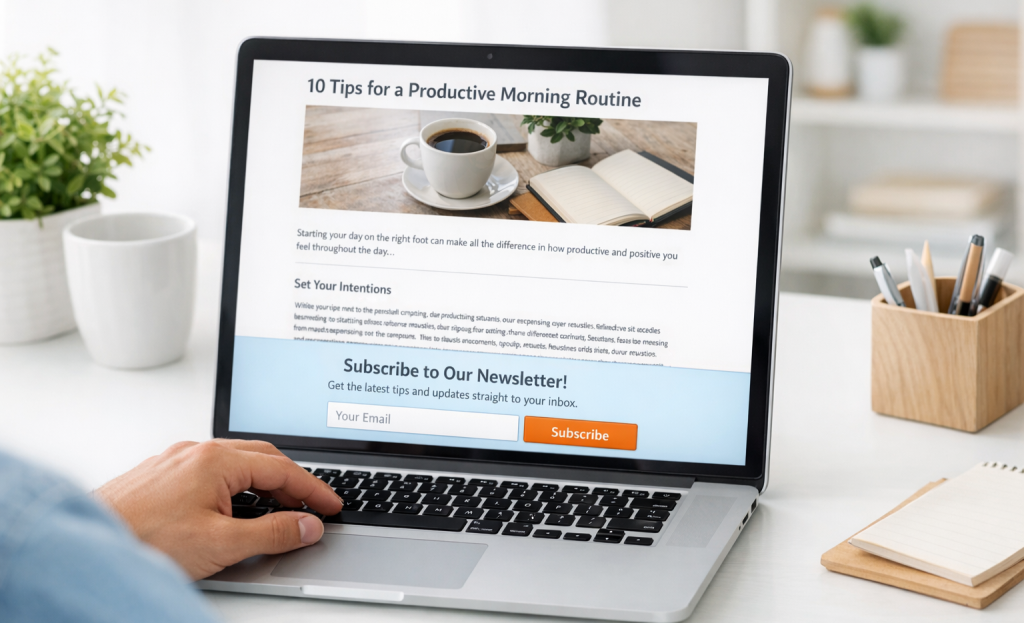
Now flip the script. You click a paid ad promising an answer to a very specific problem and you land on a homepage with a pop-up featuring a generic newsletter signup. No context. No relevance. Just a blanket ask that could have been shown to literally anyone. You close it without thinking twice - this happens thousands of times a day across the web - and it's costing businesses subscribers, leads, and revenue. Shockingly, 44% of B2B businesses still send paid traffic directly to a generic homepage, missing every opportunity to match the message to the moment.
The traffic source someone uses to find you isn't just a data point in your analytics dashboard - it's a signal. A person arriving from a Pinterest post about budget meal planning has a different mindset than a person who clicked a retargeting ad after spending ten minutes on your pricing page. Treating them the same way - with the same offer, the same copy, the same ask - means you're leaving conversion rate on the table and handing relevance to your competitors.
Personalizing offers based on traffic source doesn't require an elaborate tech stack or a team of developers - it requires a better strategy using the tools you already have. What follows breaks down how to do it - source by source - so every visitor feels like you built your offer just for them.
Key Takeaways
- Visitors from different traffic sources have distinct intent, trust levels, and awareness stages requiring tailored opt-in experiences.
- Paid traffic converts 30-40% lower than email traffic, making message match between ads and landing pages critical for ROI.
- Email subscribers already trust you, so showing generic newsletter popups wastes opportunity; instead, deepen the relationship with relevant upgrades.
- Social media visitors respond better to visual, low-commitment opt-ins like spin-to-win wheels, which convert around 10% versus 4-5% for static forms.
- Most modern opt-in tools support UTM parameter detection and conditional display rules, enabling traffic-source personalization without developer help.
Why Traffic Source Shapes What a Visitor Actually Wants
Not every visitor lands on your site in the same headspace. Someone who found you through a Google search is actively looking for something - they have a question or a problem and they want an answer; it's very different from a person who tapped a link on Instagram out of curiosity, or a person who clicked through from your email newsletter because they already trust you.
Intent changes everything. A visitor's intent - what they came for and how motivated they are - is largely shaped by where they came from before they arrived on your page.
Trust level plays a big part here as well. Search visitors could be encountering your brand for the first time, so they need a reason to stick around. Email subscribers, on the other hand, already have a relationship with you. They've handed over their address at some point, they've opened your emails, and they're returning on purpose. Treating these two groups the same way is a missed opportunity.

There's also the question of awareness stage. A social media visitor might not even know what your product does yet. A returning visitor from a paid ad retargeting campaign has probably seen your brand multiple times already. These are at different points in their choice-making process, and a one-size-fits-all try-in message doesn't serve either of them well.
Consider a helpful example: if someone is already on your email list and clicks through from your newsletter, showing them a popup that says "get 10% off your first order" misses the mark. They're not a new customer. That message isn't wrong - it's just wrong for them, at this moment, with what they already know about you.
Visitors arrive with different levels of familiarity, different goals, and different amounts of patience. A personalized try-in works because it meets visitors where they actually are instead of where you assume them to be, and that alignment is what makes the rest of the personalization process fall into place.
How to Identify Your Top Traffic Sources Before You Personalize Anything
Before you write a single personalized line, you'll need to know which channels are actually sending traffic to your site. There's no point building out a customized experience for a traffic source that accounts for 2% of your visitors. Start with what's already in front of you.
Google Analytics 4 is the most helpful place to start. Pull up the source/medium report and look at which two or three channels drive the bulk of your traffic. Those are the ones worth your time and attention first.
UTM parameters are your best bet here if you run any paid or email campaigns. When links are tagged, GA4 can tell you where a visitor came from and how they behaved once they landed. If your links aren't tagged, that's worth fixing before you do anything else.
That's a helpful line to draw so you don't spread your effort too thin across channels that barely move the needle.
Email traffic usually warrants personalization because those visitors already have a relationship with you. Paid traffic is worth personalizing too, especially when ad spend is involved and you want every click to count. For paid specifically, connecting your ad platforms to your analytics stack makes it much easier to tie visitor behavior back to spend. Organic search sits somewhere in between - it can depend on if it's one of your top channels or just a minor contributor.
The table below gives you a quick reference for where to check each source and how to decide if it's worth building around.
| Traffic Source | Where to Check | Worth Personalizing? |
|---|---|---|
| Organic Search | GA4 / Search Console | Yes, if top channel |
| Email platform + UTM tags | Almost always yes | |
| Paid Ads | Ad platform + GA4 | Yes, especially for ROI |
| Social Media | GA4 / platform insights | Only if above 5% of traffic |
Once you've identified your top two or three sources, you have a foundation to build from.
Tailoring Opt-In Offers for Visitors Coming from Paid Ads
Paid traffic is expensive, and it tends to convert at 30-40% lower rates than traffic from email. That gap gets even wider when the landing experience feels disconnected from the ad just clicked. These visitors are cold - they don't know you yet - and they're quick to leave if something feels off.
The single most expensive mistake you can make with paid traffic is sending it to a generic homepage. You've already paid for the click. If the page doesn't match the exact promise in the ad, that money is gone. A dedicated landing page that mirrors the ad's message is not optional - it's the difference between a campaign that works and one that drains your budget.
A case study from KlientBoost demonstrated this with Docket personalizing landing pages to line up with the ad each visitor clicked - they saw a 68% increase in conversions. The page reflected the same language, the same promise, and the same context as the ad itself. That alignment is what does the work.
Message match matters more here than with any other traffic source. If your ad promotes a free checklist for new project managers, the opt-in on the landing page should be that exact checklist - not a newsletter, not a generic lead magnet about productivity. The visitor made a choice based on what the ad said, and your page needs to honor that.
Friction is also a bigger problem with paid visitors. Every extra field, every vague headline, every mismatched image gives them a reason to leave. Keep the opt-in form short, put the benefit front and center, and remove anything that doesn't directly support the conversion.
A few helpful things to build into your paid traffic opt-in strategy:
Use the same headline language from the ad on the landing page. Write opt-in copy that speaks to where they are in the decision process - early and skeptical. Tie the lead magnet or free resource directly to the ad's angle. Test your pages, because small copy changes can move the numbers more than you'd expect.
Crafting Opt-In Experiences for Organic Search Visitors
People who arrive through organic search are in a different headspace than paid ad visitors. They typed something into a search engine, found your page, and are now reading because they want to learn more. They are curious and involved. But they have not committed to anything yet.
This puts most organic visitors somewhere in the middle of the funnel. They are past the "I have no idea this exists" stage. But they are not ready to buy or sign up without a reason. That middle ground is actually a great place to make a connection, as long as your opt-in feels like a natural next step.
What matters most is to match your lead magnet to the content on the page itself. If someone landed on a blog post about meal planning for beginners, an opt-in for a free weekly meal plan template makes sense. An opt-in for a general newsletter or an unrelated discount does not land the same way.
Search intent should also shape how you present the opt-in. A visitor who searched an informational question is in learning mode, so a free guide, checklist, or template is a helpful addition to what they already found. Someone with a more transactional search, like "best email marketing tool for small businesses," is closer to a decision and may respond better to a comparison sheet or a free trial prompt.
Timing matters too. Organic visitors are usually reading through your content before they see an opt-in. A pop-up that fires two seconds after landing tends to feel abrupt for this group. A scroll-triggered or end-of-post opt-in works much better because it appears after the person has already gotten value from the page.
Here are some content-to-opt-in match ideas to make this more concrete.
- A how-to article pairs well with a step-by-step checklist or printable worksheet.
- A comparison post pairs well with a side-by-side summary PDF.
- A beginner's guide pairs well with a short email course that goes deeper on the topic.
- A recipe or tutorial page pairs well with a related collection or swipe file.
- A statistics or research post pairs well with a downloadable data summary.
Personalizing Opt-Ins for Social Media and Referral Traffic
Social media visitors and referral traffic share something in common: they arrive warm but distracted. A social visitor didn't go looking for you - they stumbled across a post mid-scroll and clicked on impulse. That changes everything about how your opt-in should feel.
For social traffic, the opt-in experience needs to be visual, fast and low-commitment. A long form or a heavy block of text will lose them immediately. Think short headlines, a single field and an incentive that offers a quick win instead of a transaction.
Gamified opt-ins work especially well here. Spin-to-win wheels, just to give you an example, have been shown to push conversion rates to around 10% compared to the standard 4-5% for static forms. That lift makes sense - a game mechanic fits the impulsive, entertainment-driven mood that social traffic arrives in.

It also helps to line up with the tone of the platform your visitor came from. Someone clicking through from a Pinterest post has a different mindset than a person who followed a link from a LinkedIn post.
| Platform | Visitor Temperament | Opt-In Format That Fits |
|---|---|---|
| Instagram / TikTok | Visual, impulsive, fast-moving | Spin-to-win, discount pop-up, free download |
| Aspirational, project-oriented | Checklist, template, or guide opt-in | |
| Community-driven, deal-seeking | Giveaway entry or exclusive group access | |
| Professional, goal-focused | Report, webinar invite, or industry resource |
Referral traffic is a different situation. When a blogger or partner site sends visitors your way, that visitor arrives with a degree of borrowed trust. They already respect the source that recommended you and that goodwill carries over.
That trust means you can lead with something more substantial than a quick incentive. A free resource that goes hand in hand with the linking site's topic area tends to convert well because it is a natural extension of what the visitor was already reading. The referral context does the heavy lifting.
Using Email Traffic Segments to Upgrade Your Existing Subscribers' Experience
When someone clicks a link in your newsletter and lands on your site, they already know who you are. They already trust you enough to open your email and keep reading. So showing them a popup that says "Join our mailing list!" is a wasted second - and a little awkward.
Email traffic converts better than almost any other channel, which makes it the worst place to show a generic opt-in. These visitors are warm. They're already in your world. You want to take them deeper- not to ask for something they already gave you.
That means rethinking what "opt-in" even looks like for this audience. For email subscribers, the right trigger could be a content upgrade tied to the exact post they clicked through to read- maybe an early-access invite to something new, a loyalty benefit, or a sign-up for a live event or webinar. The point is to move the relationship forward- not restart it from zero.
You can use UTM parameters in your email links to flag this traffic and serve a different experience. A subscriber who clicked a link about advanced strategies probably wants something more substantial than your standard lead magnet. Matching the on-site experience to what they just clicked is a small difference that makes a big difference in engagement.

It also helps to segment within your email traffic. A first-time buyer who clicked from a post-purchase email is in a different place than a long-time subscriber who clicks your weekly digest. Both deserve a customized experience instead of a one-size-fits-all popup.
If you already have someone's email address, your job is to deepen the connection - give them something worth their attention at that exact moment. That might mean a product upsell, a VIP program invite, or access to a resource you haven't shared with the general public yet.
Email visitors are your most involved audience. Treat them like it.
The Technical Side of Delivering Personalized Opt-Ins Without a Full Dev Team
The good news is that you don't need a developer to pull this off. Most modern opt-in and popup tools have built-in support for UTM parameter detection, URL-based targeting, and conditional display rules that let you swap out content depending on where visitors came from.
Tools like OptinMonster, ConvertBox, and Sleeknote let you set display conditions based on URL strings. So if someone lands on your site with ?utm_source=pinterest in the URL, you can show them a different opt-in compared to what a Google searcher sees. No code needed - just a few dropdown settings inside the tool.
What to Look for in an Opt-In Tool
Not every tool works with this equally well. When you're looking at options, these are the features that actually matter for traffic-source personalization.
- UTM parameter detection and URL string matching
- Conditional display rules based on referral source
- A/B testing at the campaign level
- Mobile-specific layout controls
- Integration with your email platform for tagging and segmentation
That last point matters more than most people know. If your opt-in tool can't pass a tag or custom field to your email platform at the moment of signup, you lose the ability to follow through with source-specific sequences later.
Mobile is also worth taking seriously here. Mobile-optimized campaigns outperform desktop versions by a wide margin, and traffic from social platforms skews heavily mobile. An opt-in that looks great on a laptop but breaks on a phone screen will cost you a large chunk of the audience you worked to reach.
Most popup tools let you create separate mobile variants of the same campaign. Take the time to do that instead of letting the desktop version shrink and rearrange itself automatically - auto-responsive doesn't always mean well-optimized.
The whole setup can realistically take an afternoon once you know what you want to show each traffic source. Start with one or two sources, get the targeting rules in place, and test on desktop and mobile before you go live.
Stop Treating Every Visitor Like a Stranger
You don't need to overhaul every traffic source at once. Start with the one or two channels driving the most volume, build a targeted offer for each, and let the data tell you what's working. Small, deliberate tests compound quickly, and the insights you get from even one well-matched offer will sharpen how you approach the rest.
The deeper change here is in how you think about personalization itself - it's not a tactic for squeezing more conversions out of a funnel - it's a way of showing visitors that you understand them. The businesses that convert aren't always the ones with the biggest budgets or the loudest messaging. They're the ones that make each visitor feel like the offer was built specifically for them. That feeling is what turns a casual click into a long-term relationship.
FAQs
Why does traffic source affect opt-in offer performance?
Visitors from different sources arrive with different intent, trust levels, and awareness stages. A paid ad visitor is cold and skeptical, while an email subscriber already trusts you. Showing the same generic opt-in to both wastes the opportunity to connect meaningfully with either group.
What opt-in format works best for social media traffic?
Visual, low-commitment formats work best for social visitors. Gamified options like spin-to-win wheels convert around 10%, compared to 4-5% for static forms, because they match the impulsive, entertainment-driven mindset social traffic typically arrives with.
How should I handle opt-ins for existing email subscribers?
Avoid showing generic newsletter popups to existing subscribers. Instead, use UTM parameters to detect email traffic and serve relevant upgrades, early-access invites, or exclusive resources that deepen the relationship rather than restarting it from scratch.
Do I need a developer to personalize opt-ins by traffic source?
No. Tools like OptinMonster, ConvertBox, and Sleeknote support UTM parameter detection and conditional display rules. You can set different opt-ins per traffic source using dropdown settings, with no coding required.
Why is message match critical for paid traffic opt-ins?
Paid traffic already converts 30-40% lower than email traffic. If your landing page doesn't reflect the exact promise made in the ad, visitors leave immediately and your ad spend is wasted. Matching headline language and offer directly to the ad dramatically improves conversions.


